65+ Creative Digital Art Ideas to Try in 2026
Opening a blank canvas is always easy, but knowing what to put on it is often challenging. This is why many artists with an abundance of skills fail to create something on a regular basis: they simply do not have a clear, simple idea to start with.
This guide includes more than 65 digital art ideas to give you some inspiration to start drawing right away. All the ideas are sorted according to the style and complexity of the task. You will find different prompts for pixel art, character portraits, environments, graphic design, animation, 3D, and long-term works. The article also offers some guidance on choosing the task, the common mistakes to avoid while working on a prompt, and how to develop a single idea into a finished product.
How to Pick an Idea That Works
A good idea for digital art has three qualities:
- It should be challenging but not impossible to complete in a few sittings; if you can’t finish it, shrink it down.
- It should have a restriction built in, like a limited palette or time frame.
- You should be interested in what you’re making. Motivation will get you through the middle of a project where most unfinished files die.
- If you’re not sure if you’re a digital artist at all, or only have experience in traditional media, you should probably start with the first section below. Small victories build confidence faster than grand failures.
Tools You Can Use (Free and Paid)
You do not need expensive gear to try any of these ideas. A mouse works for many of them, though a pen tablet or tablet with a stylus makes drawing more natural.
| Goal | Tools worth looking at |
| Painting and illustration | Krita (free), Procreate (iPad), Clip Studio Paint, Photoshop |
| Vector and logo work | Inkscape (free), Affinity Designer, Illustrator |
| Pixel art | Aseprite, Piskel (free, browser-based) |
| 3D | Blender (free) |
| Layout and posters | Figma, Canva, Affinity Publisher |
Pricing and features change, so check each tool’s official site before you commit.
Simple Digital Artwork for Beginners

These need few tools and little technique. They are ideal for a first session or a warm-up.
- Color-block landscape.Build a scene from flat shapes: hills, sun, sky. No outlines.
- Three-color still life.Paint an object on your desk using only three colors plus white.
- Gradient sky study.Recreate the sky at sunrise, noon, and dusk on one canvas.
- Silhouette animals.Fill solid black shapes over a colored background.
- Geometric portrait.Build a face from triangles and circles.
- Line-only self-portrait.One brush, one line weight, no shading.
- Food illustration.Draw your breakfast. Simple shapes, bright colors.
- Pattern tile.Design a repeating pattern from a single leaf or shell.
- Cloud study.Practice soft brushes and blending.
- Weather mood scene.Show rain, fog, or snow using color and value alone.
- Emoji redesign.Draw your own version of a familiar icon.
- Object with a face.Give a mug or plant simple personality using two dots and a curve.
Character and Portrait Ideas

Characters are among the most popular digital art examples because they let you invent freely while practicing anatomy, shape, and expression.
- Original character sheet.Draw front, side, and back views with a color palette.
- Expression chart.Draw one face showing six emotions.
- Digital art of a person from a photo you took.Use your own photo, not someone else’s, and paint over it loosely.
- Historical outfit redesign.Reimagine a period costume in a modern setting.
- Animal-human hybrid.Combine two traits, such as a fox’s ears with a chef’s apron.
- Fantasy profession.Draw a potion seller, cloud mechanic, or lighthouse keeper.
- Hands study.Fill a page with hands holding everyday objects.
- Age progression.Draw one character at 8, 30, and 70.
- Family or friend caricature.Exaggerate one feature with kindness.
- Costume swap.Draw the same character in three different art styles.
Landscape and Environment Ideas
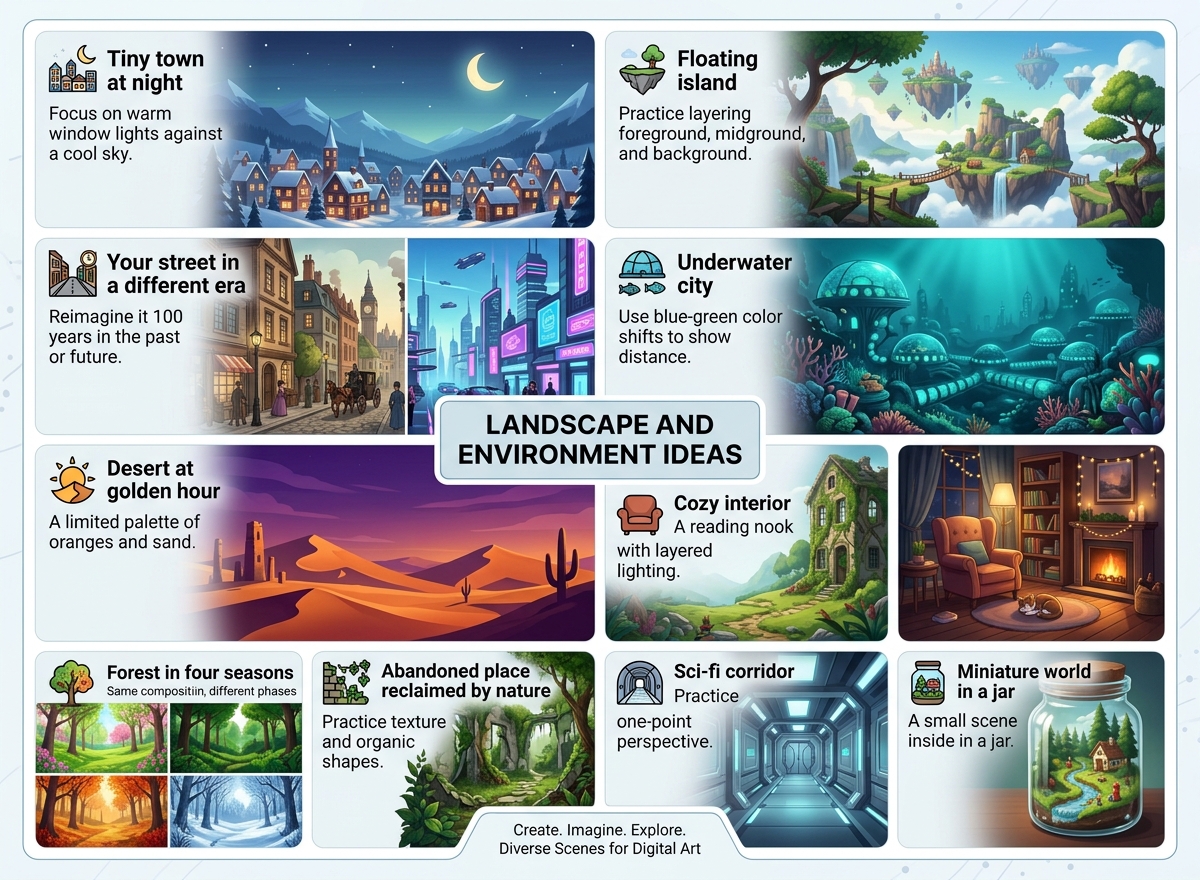
Environments teach composition, light, and depth, which improve every other kind of art.
- Tiny town at night.Focus on warm window lights against a cool sky.
- Floating island.Practice layering foreground, midground, and background.
- Your street in a different era.Reimagine it 100 years in the past or future.
- Underwater city.Use blue-green color shifts to show distance.
- Desert at golden hour.A limited palette of oranges and purples.
- Cozy interior.A reading nook with layered lighting.
- Forest in four seasons.Same composition, four color schemes.
- Abandoned place reclaimed by nature.Practice texture and organic shapes.
- Sci-fi corridor.Practice one-point perspective.
- Miniature world in a jar.A small scene inside a glass shape.
Graphic Design and Typography Ideas

Not all digital art projects involve painting. Design work builds a different, very employable skill set.
- Poster for an imaginary film.Invent the title, tagline, and mood.
- Album cover for a song you love.Design it from the feel, not the lyrics.
- Personal logo.Create three versions and compare them.
- Hand-lettered quote.Choose a short phrase and design the letterforms.
- Book cover redesign.Pick a book you know well and reinterpret it.
- Icon set.Draw 12 icons in the same style and stroke width.
- Travel poster for a fictional city.Use bold flat color.
- Sticker pack.Design six stickers with a consistent outline.
- Infographic about a hobby.Turn something you know into a clear visual.
- Monogram alphabet.Design A to Z in one consistent system.
Pixel Art and Animation Ideas
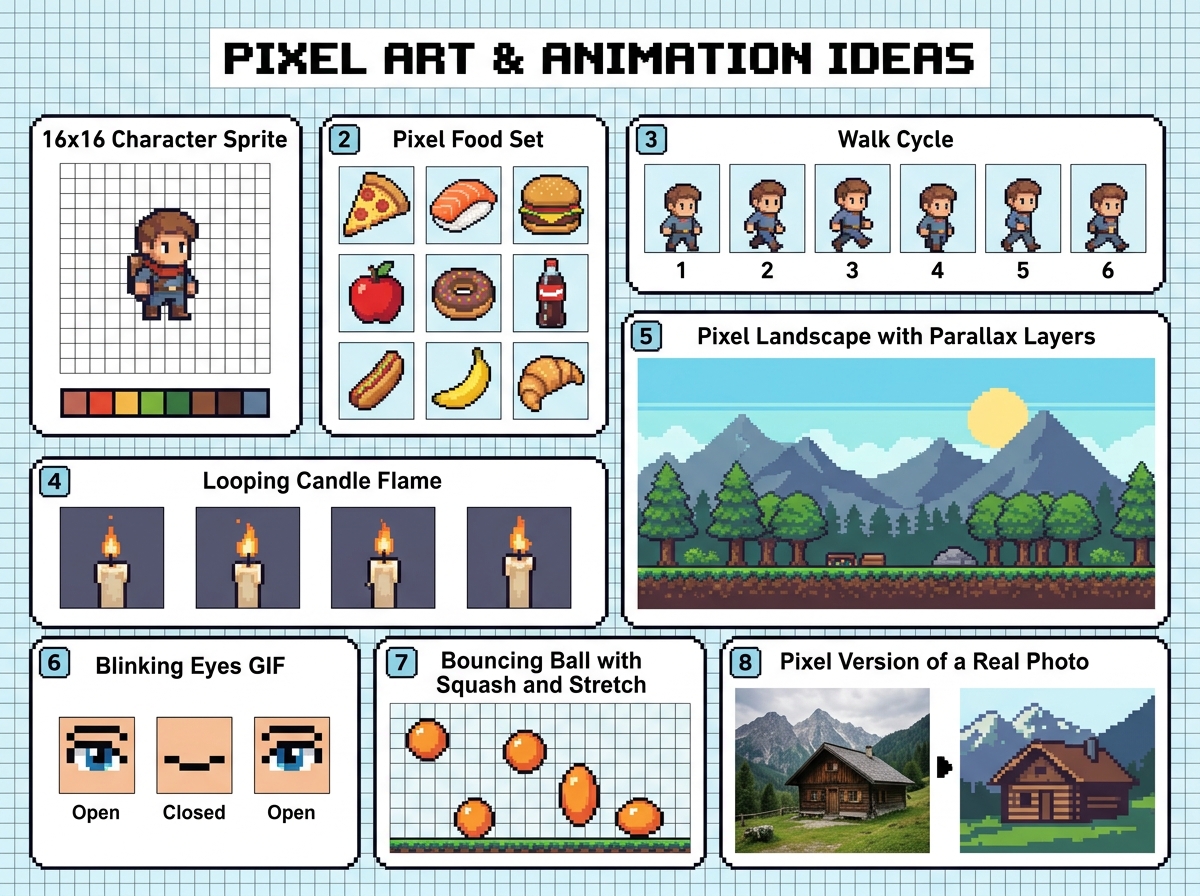
Constraints in pixel art are useful. Fewer pixels mean fewer decisions.
- 16×16 character sprite.The classic starter project.
- Pixel food set.Draw eight items on a small grid.
- Walk cycle.Four to six frames of a character walking.
- Looping candle flame.A simple animation exercise.
- Pixel landscape with parallax layers.Separate layers for depth.
- Blinking eyes GIF.A small, satisfying first animation.
- Bouncing ball with squash and stretch.The core principle of animation, in a few frames.
- Pixel version of a real photo.Reduce it to a limited palette.
3D and Mixed Media Ideas

Blender is free, so 3D is more accessible than it used to be, though it has a real learning curve. Expect the first few projects to feel slow.
- Low-poly island.Simple shapes, flat colors.
- Stylized donut or coffee cup.A common first 3D project because it teaches modeling and materials.
- Photo and paint composite.Paint over your own photography.
- Collage with scanned textures.Combine paper, fabric, and digital brushes.
- Double exposure.Blend a silhouette with a landscape.
- Glitch art self-portrait.Distort deliberately, then refine.
- Paper-cut style scene.Layers with soft drop shadows to imitate depth.
- Isometric room.Build a small room from a 30-degree grid.
Longer Digital Art Projects Worth Committing To
These are bigger, and they are where growth compounds.
- 30-day daily sketch challenge.One small piece per day, no editing pressure.
- Illustrated alphabet or bestiary.One creature per letter.
- Zine or comic.Even four pages teach storytelling and pacing.
- Personal tarot or oracle deck.Design a small set with a consistent frame.
- Redraw your old art.Pick a piece from years ago and remake it.
- Map of an imaginary world.Great for detail and lore.
- Year-in-review illustration.Summarize your year in one image.
- Portfolio series.Five pieces around a single theme, made to be shown together.
Mistakes That Slow People Down
- Copying without transforming.Studying other artists is healthy. Posting a near-copy as your own is not. Change the subject, palette, or composition, and credit your references.
- Using AI-generated or stock images as a base without checking rights.Licensing rules vary, so verify before publishing or selling.
- Polishing too early.Get shapes and values right before rendering details.
- Picking too many tools at once.Learn one program well first.
- Deleting bad pieces.Keep them. They show your progress later.
A Simple One-Week Starter Plan
- Day 1: Idea 1 (color-block landscape), 0.5 hours.
- Day 2: Idea 2 (three-color still life).
- Day 3: Idea 14 (expression chart).
- Day 4: Idea 28 (cozy interior).
- Day 5: Idea 43 (16х16 sprite).
- Day 6: The task is to choose the best among the works done during the week and improve it.
- Day 7: publishing the result somewhere and requesting a concrete piece of feedback from someone.
Final Thoughts
You don’t need the perfect digital art ideas. You need a tiny starting point and a reason to stop. Pick one of these and make something bad today. Set a timer, get it done. Then go to another one.
Frequently Asked Questions(FAQs)
What is the easiest digital art to start with?
Flat-color shapes and silhouettes are the best. You will not need to use shading or anatomy skills.
Do I need a drawing tablet?
No. You can use a mouse to create pixel art, vector graphics, and collage. But a tablet is better for digital painting and sketching.
How long should I work on each piece as a beginner?
Thirty to sixty minutes per piece is a good start. But the more time you spend, the better. If you work on small pieces, it will be easier to do them without pressure. A short break is also better than a long one.
How can I find my unique style?
Just create a lot of work and look at your repetition. For example, you may notice that you always draw the same colors, shapes, or subjects. The more you make, the more patterns you will see in your work. But there is nothing to force you to have a style.
Can I sell digital art I make using these ideas?
It depends on how you make it. You can usually sell original work, but you may need to credit the people who created the brushes, fonts, and references you used.